Path to Purchase is designed for brands with retail distribution who want to show retail buyers that they’re actively driving in-store awareness and purchase. Instead of sending creators a product to shoot at home, you’re sending them into the store.
It isn’t a brief type. It’s a campaign you run on one of two brief types — an Influencer Partnership brief or a Seeding brief. Which one you pick depends on whether you need to approve the footage or need volume. Both are covered below.
What Path to Purchase Is For
Path to Purchase campaigns are built for moments like a new retail launch, a seasonal endcap placement, or any time you want proof-of-concept content showing your product in the wild. Creators go to the store — a Target, Walmart, Ulta, or wherever your product is stocked — find your product in the aisle, and capture video content on-location.
This content serves two audiences:
- Consumers — authentic, in-store content that drives product discovery and purchase intent
- Retail buyers — tangible evidence that you're investing in marketing support around their shelf placement
Which brief type to run it on
Influencer Partnership is right when you need a person to approve the footage before it posts and to guarantee the channel it posts on. It is priced per creator, so it tops out well before a hundred creators a month.
Seeding is right when you need in-store content at volume. The product setup is identical — choose Creators to purchase in store, add the store locator, product image and product link — and you keep the retailer direction. What changes:
| Influencer Partnership | Seeding | |
| Retailer direction | Yes | Yes |
| In-store evidence enforced in the content | Yes, by your review | Yes, by AI Asset Analysis (1–5 requirements) |
| A person approves footage before it posts | Yes | No — AAA clears it automatically |
| Guaranteed posting channel | Yes | No — creators post on the channel they choose |
| Chat with creators | Yes | Outbound only — Finn mass message, no replies |
| Creator cost | Creator compensation you set | $35 per completed creator, plus product and reimbursement |
A good rule: use Influencer Partnership when the footage is going to a retail buyer and has to be right. Use Seeding when you are driving in-store awareness and want the post count. See What is a Seeding Brief?
Setting it up on an Influencer Partnership brief
1. Select "Influencer Partnership" as your brief type
The strategy here is creator-led, in-store content meant for social posting.
2. Choose your platform and deliverable
Select the platform you want creators to post on (Instagram or TikTok are most common) and specify your deliverable quantity and post type on Instagram (Reel, Story, or Post).
3. Set your location and retailer requirements
In the product section, choose Creators to purchase in store 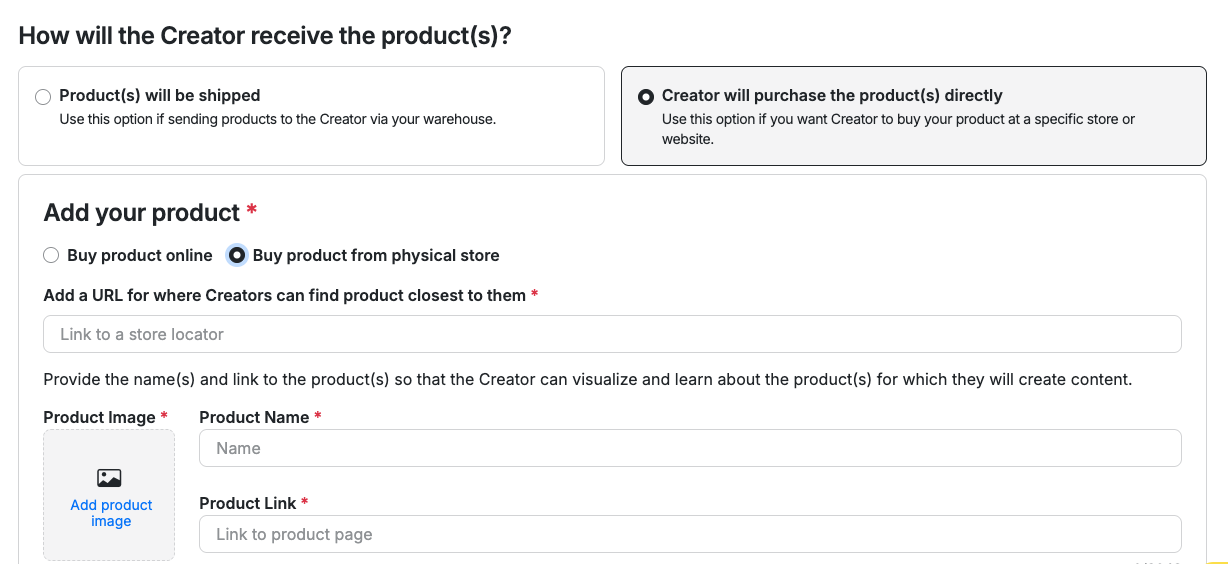
- Store locator: which retailer the creator should visit
- Product image: great visual so they can easily identify it on the shelf
- Product link: can help ensure availability at their local store
4. Specify content requirements
Give creators clear direction on what to capture. Strong Path to Purchase content typically includes:
- The product clearly visible in the store aisle or on the shelf
- The store logo or signage visible in frame (this is what makes it retail-verified)
- Natural, unscripted narration or reactions — this shouldn't look like a studio shoot
- A clear call to action (e.g., "Find it now at Target!")
5. Set your posting deadline
Assign a deadline for when content needs to be posted. If this is tied to a retail launch or a buyer presentation, work backwards from that date.
6. Set compensation
Factor in that creators need to travel to a store and capture content on-location. Compensation should reflect the time and effort involved beyond a standard home shoot.
7. Brief screening
Add a yes/no question to have Creators confirm that they are willing to go to their local retailer to film.
Setting it up on a Seeding brief
Three steps, and the first is the same one as above.
- Product — choose Creators to purchase in store and add the store locator, product image and product link, exactly as in step 3.
- Goal of your brief - use this section to provide platform guidance, hashtags, captions, mentions, or overlays you prefer, but this is a general low direction brief flow.
- Targeting — you don’t write a screening question on a Seeding brief, and you don’t need one. If you want applicants to confirm, state the requirement in your creator criteria in plain language — “must go to Target to purchase” — and Cohley generates the question for you.
- AI Asset Analysis requirements — this is where the in-store evidence gets enforced. “Show the outside of the Target store,” “show the product in its position on the shelf,” a call to action to “buy at Target.” Content only clears to post once it passes, and you get 1–5 requirements.
You can’t approve individual assets or send change requests on a Seeding brief, and creators can’t reply to you, so the requirements above are doing the work that your review does on an Influencer Partnership brief. Full setup: What is a Seeding Brief?
Why This Works
Retailers want to know that brands are putting marketing muscle behind the products they carry. Path to Purchase content gives your team:
- A content library of authentic, in-store footage you can use in owned and paid channels
- Documented proof to share with retail buyers that you're driving consumer awareness
- Social content that signals product availability and drives in-store traffic
Tips
- The more specific your brief, the better the content. Tell creators exactly which aisle, which section, and what the shelf placement looks like so they can find it quickly.
- If your product is at multiple retailers, consider running separate briefs per retailer so you have clean, retailer-specific content.
- In-store content pairs well with a paid media boost — once you have strong-performing in-store Reels or TikToks, you can amplify them. See How to Run a Paid Media Brief on Cohley for that setup.
Have questions? Contact support@cohley.com
Was this article helpful?
That’s Great!
Thank you for your feedback
Sorry! We couldn't be helpful
Thank you for your feedback
Feedback sent
We appreciate your effort and will try to fix the article