Social Performance enables you to compare engagement, impressions, and earned media value (EMV) across platforms. All posts included on the Social performance page come from Influencer Partnership and Seeding briefs where Instagram or TikTok were selected as the social platform. Seeding posts appear as organic — ad codes aren’t requested on Seeding briefs, so there’s no paid split for them. After a Creator has added their post to the brief, metrics will immediately be available.
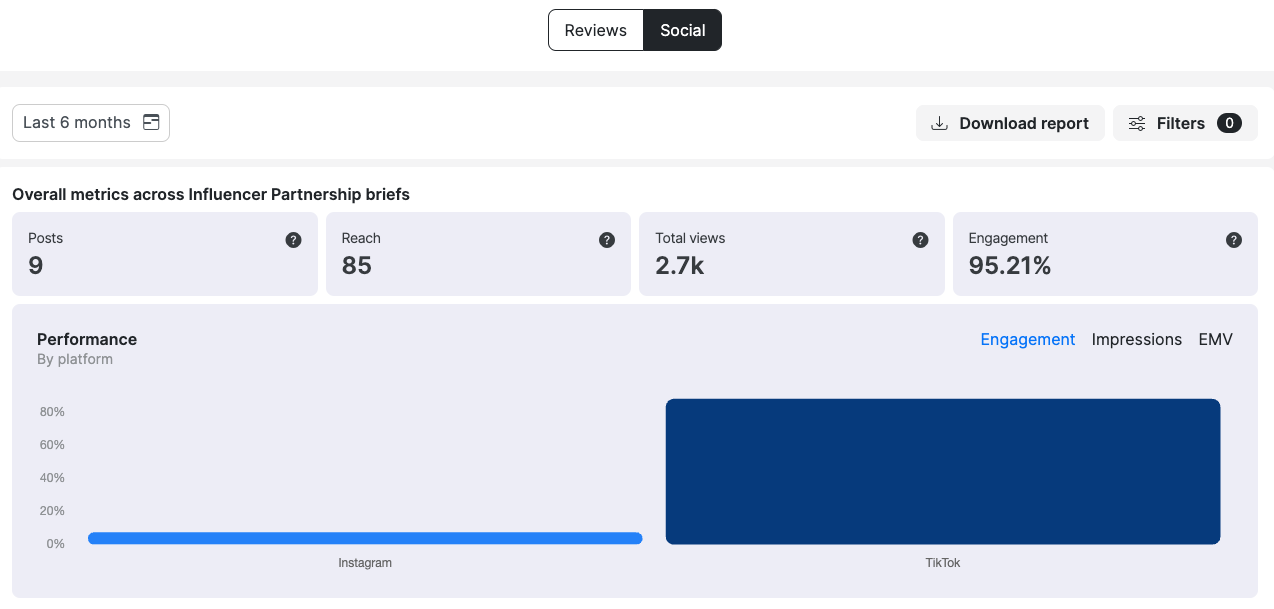
Click on 'Last 6 months' to change the timeframe, Download report to see a brief level summary in excel, or update Filters by Creator, Brief, and/or Brief type (Seeding or Influencer Partnership).
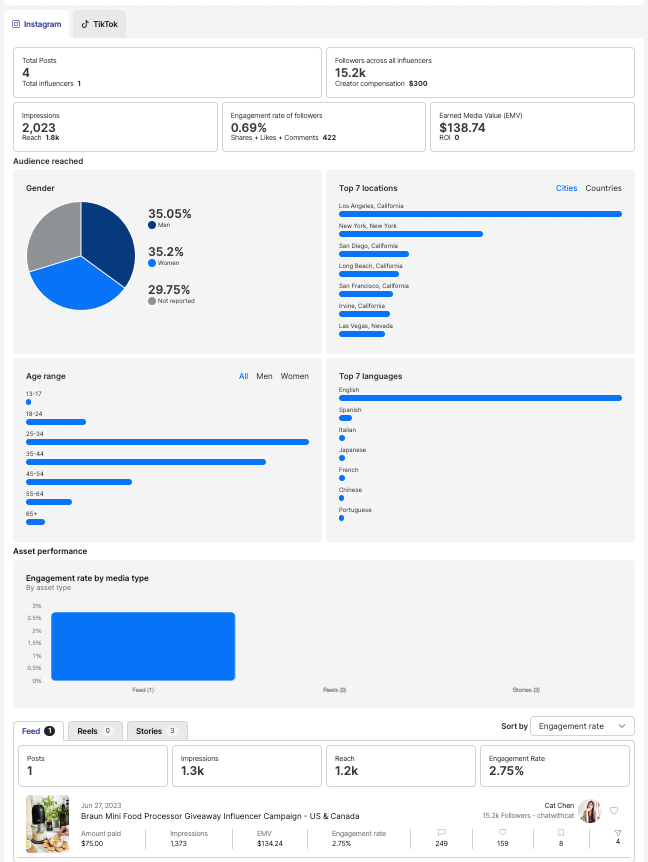
Use the tabs for Instagram and TikTok to see the aggregated audience metrics, Instagram media type analysis, and individual post metrics. Sort each media type by engagement, views, EMV, or followers to assess the effectiveness of each partnership. Favorite Creators can easily be hearted from here!
What if a Creator posts on both Instagram and TikTok?
If a Creator on an Influencer Partnership brief uses Cohley’s Extra Post option to cross-post, what you’ll see in performance depends on which platform the brief was launched on:
- TikTok brief + Instagram Extra Post — both posts show up on the Social performance page. You’ll see metrics for the TikTok post (required deliverable) on the TikTok tab and the Instagram post (Extra Post) on the Instagram tab, with the same data points (engagement, impressions, EMV) for both.
- Instagram brief + TikTok Extra Post — the Instagram post’s metrics flow in normally, but the TikTok Extra Post’s metrics can’t be pulled. TikTok requires the brief’s invite URL to pull performance data, and that URL is only generated on TikTok-platform briefs.
If cross-platform measurement matters to your campaign, launch the brief on TikTok so the invite URL is in place. Creators can then add Instagram as the Extra Post and you’ll see metrics for both.
Can I compare Seeding posts to Influencer Partnership posts?
Yes. Use the Brief type filter to show only Seeding posts or only Influencer Partnership posts, across every brief in the selected timeframe. This is the quickest way to compare how gifted content performs against paid partnerships on the same metrics (engagement, impressions, EMV). Leave the filter off to see everything together. Keep in mind Seeding posts are organic only, so there’s no paid split to compare on that side.
How is the data calculated?
- Post Image = pulled from Instagram or TikTok
- Post date = Date when post was created on Instagram or TikTok
- Brief name = Brief where the post was added by the Creator
- Engagement = (likes + comments + shares + saved)
Reach = Unique people that saw the post
Amount paid = payment that creator received in brief / count of post Creator uploaded in brief.
Impressions* = Total views of individual post
- EMV (earned media value) = (views/1000*6) + (((Likes×1.5) + (Sends×2.0) + (Comments×1.0) + (Saves×0.8)) * 0.5)
Engagement rate = (engagement / creator followers) * 100
Likes = Pulled from social API - not available for Instagram stories
Comments = Pulled from social API - replies for stories and comments for feed, reels, and TikTok posts
Saved = Pulled from social API - not available for Instagram stories
Shares = Pulled from social API - not available for Instagram stories
Creator Heart - ACTION - Heart for the Creator to be prioritized among applicants in future briefs
*A note on impressions: Impressions for Meta (Instagram) reflect organic activity only — they do not include Facebook impressions or boosted/paid impressions. TikTok views include both organic and paid (Spark Ads) activity, and are split in two separate line items.
When is the data updated?
- Metrics appear immediately when the post is added, and then update daily for 90 days after the post has been associated with the Cohley brief, with the exception of stories which are only 24 hours of metrics. Boosted posts keep updating for longer than 90 days. Where you have sparked a post and the ad code runs past that, Cohley carries on pulling performance for as long as the boost window you requested — up to 365 days — so the paid half does not stop reporting at 90.
- Instagram only provides Instagram metrics. If a reel is shared on both Instagram and Facebook, reel plays will not include plays from Facebook.
Why does gender show as “Not Reported”?
- Gender is self-reported on Instagram — creators aren’t required to provide it. When a creator hasn’t shared their gender, it displays as Not Reported instead of a value. This is expected and doesn’t mean the data is missing or broken.
Was this article helpful?
That’s Great!
Thank you for your feedback
Sorry! We couldn't be helpful
Thank you for your feedback
Feedback sent
We appreciate your effort and will try to fix the article