Rejecting and blocking are two different actions — here’s how each works:
Reject a Creator (this brief only)
Have a Creator you don’t want to work with on this brief? Reject them. They’ll disappear from your list and your applicant count will decrease. The Creator is notified only that they were not selected for this one brief — rejecting does not affect their ability to apply to your other briefs.
This is a great way to clear your desk and focus on the applicants who remain.
Block a Creator (all future briefs)
Tired of seeing the same Creator across multiple briefs? Blocking prevents that Creator from applying to any of your future briefs. Blocking is a separate action from rejecting — rejecting a Creator does not block them. A blocked Creator is never told they’ve been blocked; they only ever see that they were rejected from an individual brief.
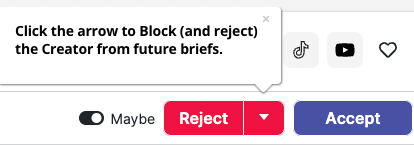
Finn can block Creators too. If there is a Creator you did not enjoy working with, just tell Finn to block them — "block [Creator name]". Finn names the Creator and spells out what will happen before it does anything, so you get a chance to confirm you have the right person. This works for any Creator at any time — they don't need to be sitting in a brief's applicant list for you to act on them.
Made a mistake?
A rejection can be reversed: open the filter panel to view rejected applicants and add the Creator back to the brief.
A block can be undone by asking Finn. Say "unblock [Creator name]" in chat — Finn confirms who you mean and what will happen before it acts. Finn can also tell you who you currently have blocked. There is no unblock action in the platform, so this is the way to do it.
Two things unblocking does not do: it doesn’t add the Creator back to any brief they were removed from when you blocked them, and it doesn’t automatically return them to your Creator Hub. Unblocking means they can apply to your briefs again going forward.
Was this article helpful?
That’s Great!
Thank you for your feedback
Sorry! We couldn't be helpful
Thank you for your feedback
Feedback sent
We appreciate your effort and will try to fix the article