A Path to Purchase brief is designed for brands with retail distribution who want to show retail buyers that they're actively driving in-store awareness and purchase. Instead of sending creators a product to shoot at home, you're sending them into the store.
What This Brief Type Is For
Path to Purchase briefs are built for moments like a new retail launch, a seasonal endcap placement, or any time you want proof-of-concept content showing your product in the wild. Creators go to the store — a Target, Walmart, Ulta, or wherever your product is stocked — find your product in the aisle, and capture video content on-location.
This content serves two audiences:
- Consumers — authentic, in-store content that drives product discovery and purchase intent
- Retail buyers — tangible evidence that you're investing in marketing support around their shelf placement
Step-by-Step: Setting Up the Brief
1. Select "Influencer Partnership" as your brief type
The strategy here is creator-led, in-store content meant for social posting.
2. Choose your platform and deliverable
Select the platform you want creators to post on (Instagram or TikTok are most common) and specify your deliverable quantity and post type on Instagram (Reel, Story, or Post).
3. Set your location and retailer requirements
In the product section, choose Creators to purchase in store 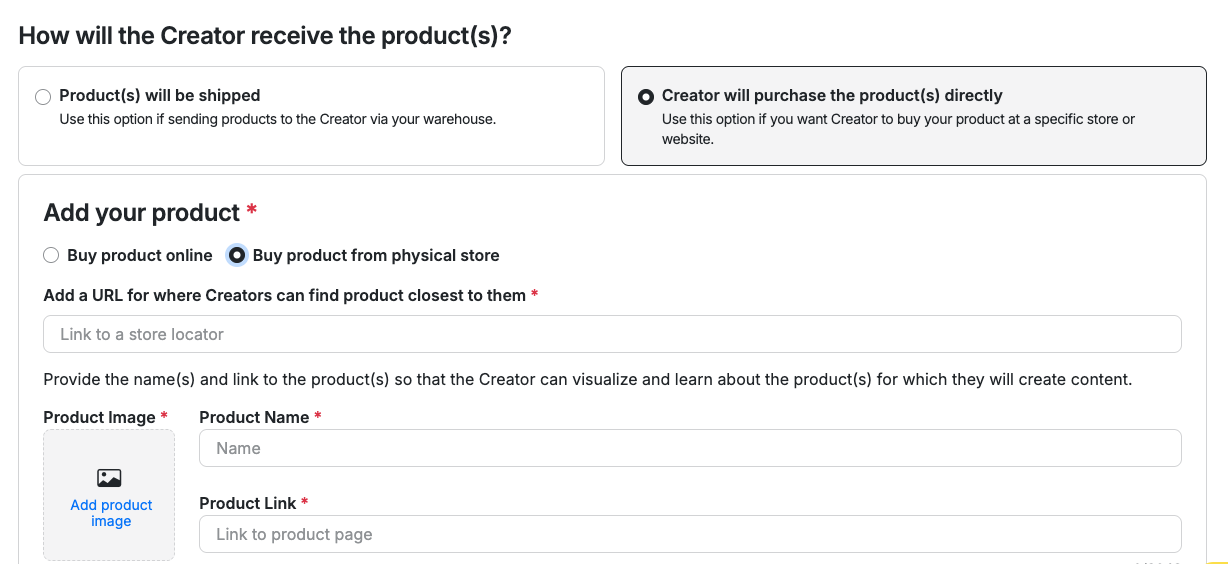
- Store locator: which retailer the creator should visit
- Product image: great visual so they can easily identify it on the shelf
- Product link: can help ensure availability at their local store
4. Specify content requirements
Give creators clear direction on what to capture. Strong Path to Purchase content typically includes:
- The product clearly visible in the store aisle or on the shelf
- The store logo or signage visible in frame (this is what makes it retail-verified)
- Natural, unscripted narration or reactions — this shouldn't look like a studio shoot
- A clear call to action (e.g., "Find it now at Target!")
5. Set your posting deadline
Assign a deadline for when content needs to be posted. If this is tied to a retail launch or a buyer presentation, work backwards from that date.
6. Set compensation
Factor in that creators need to travel to a store and capture content on-location. Compensation should reflect the time and effort involved beyond a standard home shoot.
7. Brief screening
Add a yes/no question to have Creators confirm that they are willing to go to their local retailer to film.
Why This Works
Retailers want to know that brands are putting marketing muscle behind the products they carry. Path to Purchase content gives your team:
- A content library of authentic, in-store footage you can use in owned and paid channels
- Documented proof to share with retail buyers that you're driving consumer awareness
- Social content that signals product availability and drives in-store traffic
Tips
- The more specific your brief, the better the content. Tell creators exactly which aisle, which section, and what the shelf placement looks like so they can find it quickly.
- If your product is at multiple retailers, consider running separate briefs per retailer so you have clean, retailer-specific content.
- In-store content pairs well with a paid media boost — once you have strong-performing in-store Reels or TikToks, you can amplify them. See [How to Run a Paid Media Brief on Cohley] for that setup.
Have questions? Contact support@cohley.com
Was this article helpful?
That’s Great!
Thank you for your feedback
Sorry! We couldn't be helpful
Thank you for your feedback
Feedback sent
We appreciate your effort and will try to fix the article